Buy a Lyft Phone Number for Verification
Buy a temporary Lyft phone number to register a new account. Pick a country, get the verification code, walk away — about 90 seconds, pay-as-you-go.
Quick Take
Need a Lyft account that's not tied to your daily SIM? Buying a temporary Lyft number is the practical fix. Pick a country, get the code, walk away. The whole thing takes about 90 seconds — no subscription, no commitment, no nonsense.
Why You'd Buy a Lyft Number
Four real situations where this is the move.
Trying Lyft's new rider promo on a fresh account
Lyft runs ongoing "New Rider Promo" offers — free credits, discounted first rides, $10 off the next ride, varying by city and season. The promo is tied to the phone number on the account. If you already used yours on Lyft years ago, a fresh number opens the door to the offer again. Lyft's own terms exclude virtual numbers from promo eligibility — see step 2 in How to Buy below for which dashboard category Lyft accepts.
A city-specific account when moving or traveling
You're moving to Austin and want a local-number Lyft account so receipts, support, and the routing algorithm read as local. You're traveling to London for a month and want a UK number on file. A bought temporary number gives you the country and area code without buying a SIM.
Replacing an old, unreachable Lyft account
You lost the SIM. You changed carriers. The number on your old Lyft account stopped receiving SMS, and the recovery flow doesn't move forward. A clean new account on a bought number gets you riding again today, while you sort out the old one separately (or just don't).
Separate accounts for work vs personal trips
Freelancers, sales reps, anyone whose work involves driving to client sites — you want one Lyft account for billable trips (clean history, separate receipts) and one for everything else. Two accounts, two numbers, clean separation. Same approach scales if you operate region-specific rider profiles for content, research, or testing.
How to Buy and Verify in 90 Seconds
- Open the DogeSMS dashboard, search Lyft.
- Pick the regional country category, not the Virtual one. On the dashboard you'll see two USA options: United States (marked Recommended, Avg OTP around 54 seconds) and United States (Virtual). For Lyft, pick United States, not the (Virtual) one. Lyft writes "no VoIP / virtual numbers" right into their terms — and not just for new-rider promos. They enforce it at the eligibility filter on signup. The (Virtual) category is exactly what Lyft filters out. Pick the recommended one and skip the guesswork.
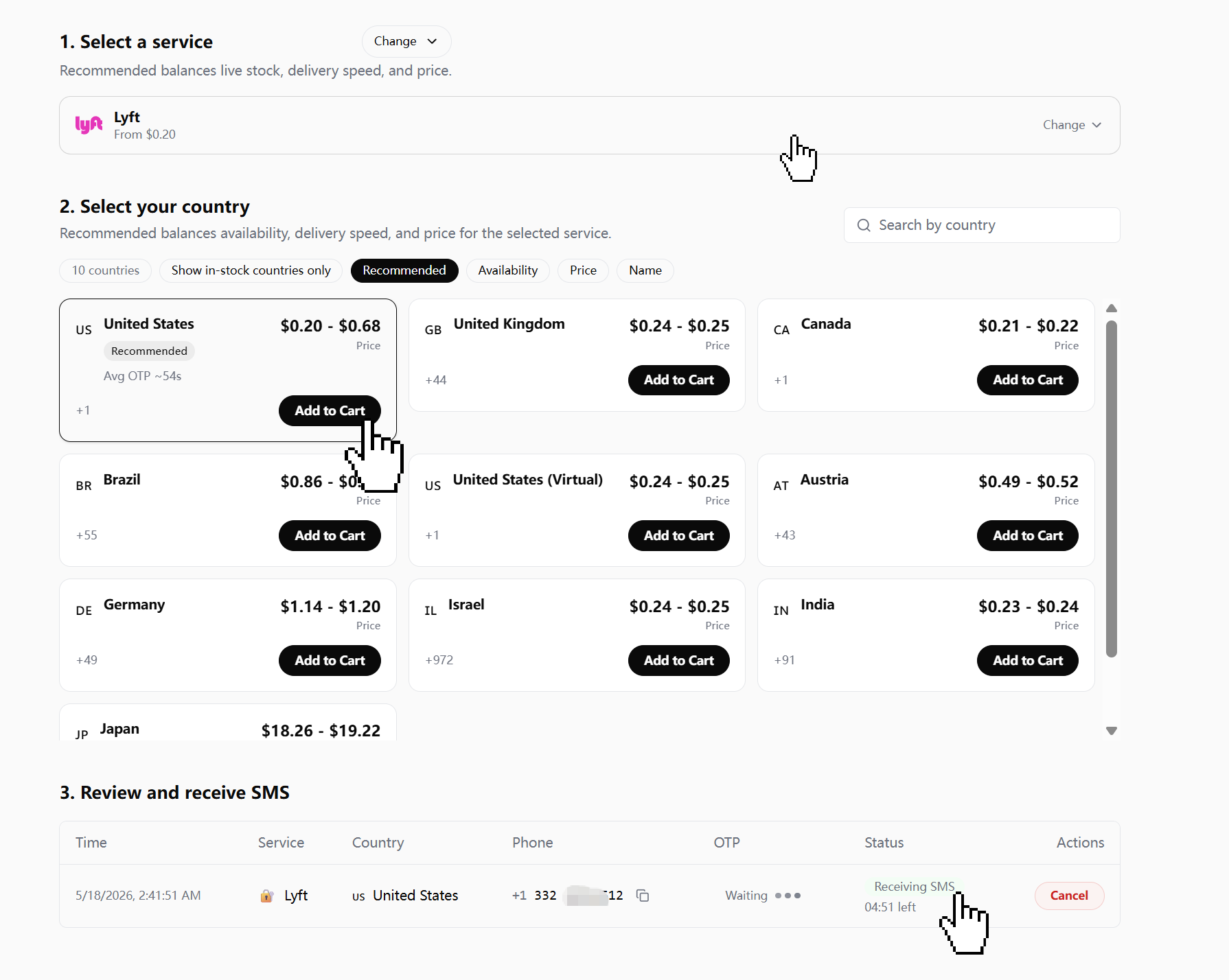
The DogeSMS dashboard already marks United States as Recommended (Avg OTP ~54s). United States (Virtual) is the category Lyft's filter rejects — skip it.
- Buy the number — pay-as-you-go. Pricing's on the dashboard, varies live. Less than your first-ride bonus anyway.
- Open Lyft, enter the bought number, request the code.
- The code lands in your DogeSMS dashboard. Paste it back into Lyft.
Country guide
Lyft currently operates in the US, Canada, and the United Kingdom (post-Gett acquisition).
| If you want... | Pick on dashboard |
|---|---|
| US-region account | United States — not United States (Virtual) |
| Canada-region account | Canada (+1) |
| UK / European traveler | United Kingdom (+44) |
Only the United States listing has a separate (Virtual) entry — the rest are single regional categories. For Lyft specifically, the rule is simple: see "(Virtual)" in the name, skip it.
When This Approach Hits Its Limits
Three cases where a one-shot number isn't what you want.
Becoming a Lyft driver
Driving for Lyft requires SSN, a state driver's license, vehicle registration, insurance, and a background check — all tied to your verified identity. A bought temporary number doesn't get you past day one of the application. Lyft driver onboarding is identity-bound by design, and any "shortcut" here just wastes the number. Save your money — this won't work. Period.
Filing trips for business expense reimbursement
If trips need to land on a W-2 / 1099 / company expense account, the Lyft account has to be tied to your verifiable identity (real name, real billing address, sometimes a corporate Lyft Business profile). A temporary-number account doesn't produce reimbursement-ready receipts.
Lyft Pink long-term membership
Lyft Pink is a recurring monthly subscription billed to a card you control. If the goal is a long-term Pink membership — priority pickups, member discounts, the airport perks — you want an account tied to a number you'll still have access to in six months, not a one-shot rental.
After Verifying — Set Up Right
The part most guides skip. The first 24 hours and a few small settings make the difference between an account you can rely on and one that locks itself out the next time you log in.
Profile basics in the first 24 hours
Add a name and (optionally) a profile photo within the first day. Lyft's risk graph reads brand-new empty profiles more cautiously than ones that look like normal riders. Five minutes of setup, real reduction in friction later.
Recovery email
Lyft → Settings → Account → Email. Add an email you control long-term. The bought number rotates back to the SMS pool after your rental window; the email is what keeps account access in your hands when Lyft asks for re-verification down the line.
Payment method and linked services
Add a payment method early — the new-rider promo usually requires a card on file before the credit applies. Decide intentionally whether to link Facebook, Apple, or Google sign-in: once linked, those become alternative recovery paths, but they also tie this Lyft account to those identities. For a clean separation account, skip the social logins.
Number, code, Lyft account — done. Set the profile, set the recovery email, and the account is yours.
Looking for the bigger picture? Read the full Temporary Phone Number guide — when to use one, when not to, and how the pieces fit together.