Codex Phone Verification: Fix the Missing SMS Code | DogeSMS
Codex CLI asking for phone verification but no SMS code arrives? Four real culprits — WhatsApp routing, silent resend throttling, format bugs, IP region check — and how to fix each.
Quick take: Codex doesn't issue its own verification
If you opened Codex or the Codex CLI today and got asked to verify a phone number, you're not alone. OpenAI has been tightening account verification over the last couple of months — especially for Codex CLI, new-device logins, and API key creation — to push back against scripts mass-registering free accounts.
One thing worth getting straight up front: Codex doesn't issue its own verification code. What's actually firing is OpenAI's account-layer verification. Codex is just where the wall happens to be in front of you.
That distinction matters because it tells you what service to pick when you go to buy an SMS code: look for OpenAI / ChatGPT, not "Codex." Search engines will surface a lot of "Codex SMS" results, and most of them are mis-aimed for the same reason — the pipeline isn't actually Codex's.
Same account, different risk threshold
The most common pattern: ChatGPT works fine in the browser. Codex CLI immediately demands a phone number. Same account.
OpenAI's risk model isn't uniform across entry points. Codex CLI, new-device sign-ins, and API key creation get tighter risk gates than browser chat — because that's where the abuse scripts concentrate. Your account didn't change. The gate did.
What this means for picking a service: you're not buying a "Codex number." You're buying an OpenAI / ChatGPT verification. Same SMS pipeline, same number type. Period.
Which countries actually work for Codex verification
The "allowed country" list shifts slightly by account, time, and IP, but a few patterns hold up:
- US (+1) — generally routes SMS, broadly accepted
- UK (+44) — generally accepted, but watch the formatter bug below
- Russia (+7) — generally accepted
- India (+91) — generally accepted
- Western Europe (+33, +49, +34, +39, etc.) — usually accepted, mix of SMS and WhatsApp routing
- Parts of Southeast Asia — case-by-case, watch the WhatsApp-routing tell (covered below)
A few things that look like a number problem but aren't — these come up repeatedly in openai/codex GitHub issues and the OpenAI Developer Community:
- Long-time ChatGPT user, suddenly asked for phone. Your account isn't compromised. OpenAI is tightening risk gates on Codex CLI, new-device sign-in, and API key creation paths — older accounts that were never asked for phone are now being asked. (Issue #20161 on
openai/codexdescribes one such case, and similar reports stack up across the issue tracker.) - No SMS option, WhatsApp only. For some country choices, OpenAI doesn't even surface SMS as a fallback. This is a country-routing issue, not a number-quality issue.
- One phone, multiple Plus accounts. OpenAI caps how many accounts a single phone can verify. Users running 2-3 Plus subscriptions for separate workflows hit this exact wall. (Issue #20884.)
If your country isn't on the working list above and nothing arrives, the country choice is more likely the problem than the number itself.
Why your code isn't arriving
Four actual reasons. Most "the platform is broken" complaints come back to one of these. Listed from most to least common.
1. The country routes via WhatsApp, not SMS
This is the silent killer.
Some country codes get verification via WhatsApp, not SMS. If your number is on an SMS-only channel, the message never lands — because OpenAI never sent it over SMS in the first place.
You can switch numbers all day; it won't fix it. The pipe isn't broken — your country choice routed the message somewhere your SMS channel can't see.
How to tell: the OpenAI verification screen will say "a code has been sent to ... via WhatsApp". That's the tell. US, UK, and Russian numbers generally route SMS and behave normally.
2. Hitting "resend" silently rate-limits you
OpenAI's backend throttles repeated resend requests, quietly. You don't get a UI error — the request just disappears. (The openai/codex discussion threads have confirmed this is the dominant cause of "code never arrives" reports — not a guess.)
The mechanic is anti-script. The collateral damage is impatient real users.
If your first one or two attempts didn't land, stop clicking. Wait 15–20 minutes. Try once more after the cooldown. That single click usually goes through.
3. Region-specific number format bugs
A few country codes have an actual bug in OpenAI's formatter:
- UK (+44): OpenAI sometimes inserts a leading 0 after the country code, producing a number it then can't deliver to. Community workaround: drop the leading 0 from the national part manually and resubmit.
- Ethiopia (+251): Same leading-0 bug, with an open GitHub issue tracking it.
On a less-common country code and getting nothing? Suspect the format before suspecting the number — the number is often fine; the extra 0 just confuses OpenAI's own delivery system.
4. A 403 "country not supported" usually means IP, not number
If you actually entered the code and then hit Token exchange failed: Country, region, or territory not supported (403) — that's typically an IP issue, not a number issue. OpenAI does a final region check on your egress IP. Shared proxies and flagged residential IPs get caught here.
Switching numbers won't fix this — your number may have already accepted the code successfully. The problem isn't at the number layer.
The fix is a cleaner, more reserved residential IP and re-running verification from a clean session.
Error message cheat sheet: matching symptom to root cause
Most "the number doesn't work" reports trace back to something else. Match your symptom against the table before swapping numbers:
| What you see | Actual root cause | What to do |
|---|---|---|
invalid_phone_number (entered +86) | OpenAI doesn't support China mainland numbers | Use a supported region (US / UK / RU, etc.) |
Verification screen says a code sent via WhatsApp | Country routes via WhatsApp, not SMS | Switch to a country that routes SMS |
| Multiple resends, no code lands | OpenAI's silent rate limit kicked in | Stop clicking. Wait 15-20 minutes, try once more |
Number displayed as +44 0xxxx or similar | OpenAI format bug adds a leading 0 | Manually drop the leading 0 and resubmit |
403 Country not supported after entering the code | Your egress IP is flagged — not the number | Use a clean residential IP, re-run verification |
| ChatGPT works on the web, Codex CLI demands phone | Different entry points have different risk thresholds | The CLI gate is mandatory; no way around it |
| Repeated failures push the account into a stricter state | Too many failed attempts in a short window | Wait 24 hours. Don't burn through numbers in panic |
If your error doesn't match any of these, OpenAI may have temporarily tightened risk controls. Swapping numbers won't help — wait a few hours and try once typically does more than banging on it right now.
Using DogeSMS for Codex verification: a 5-step walkthrough
Since Codex verification routes through OpenAI's account layer, pick the OpenAI / ChatGPT service card in the DogeSMS dashboard. Not a separate "Codex" listing — that's literally the pipeline.
Five steps and you're through.
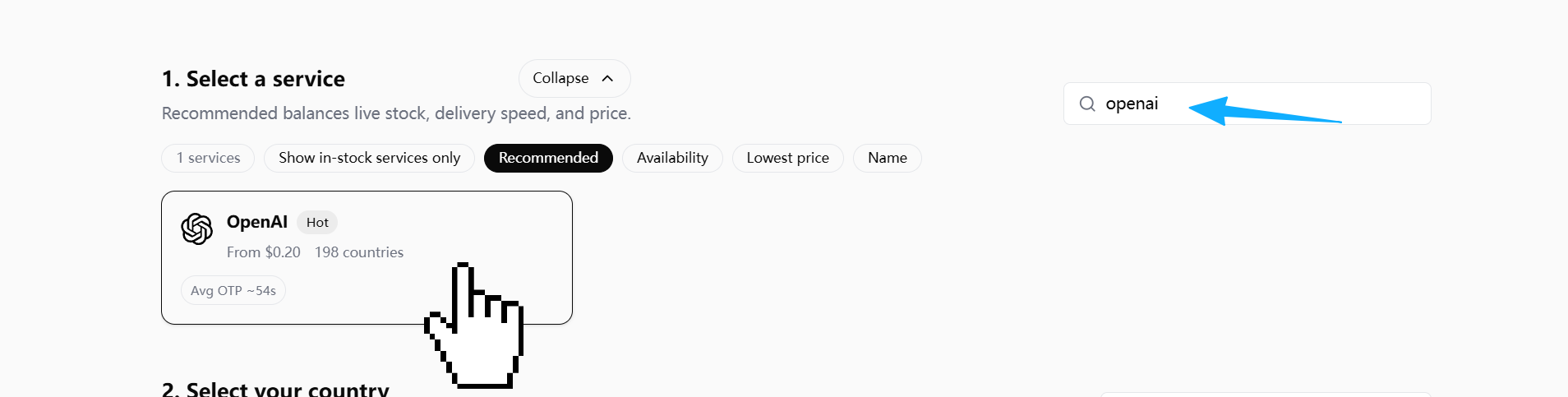
Step 1: In DogeSMS, search OpenAI and pick the service card
Step 2: Pick a country
Prefer US / UK / RU — they generally route SMS. If the OpenAI page later says "sent via WhatsApp", come back here and pick a different country.
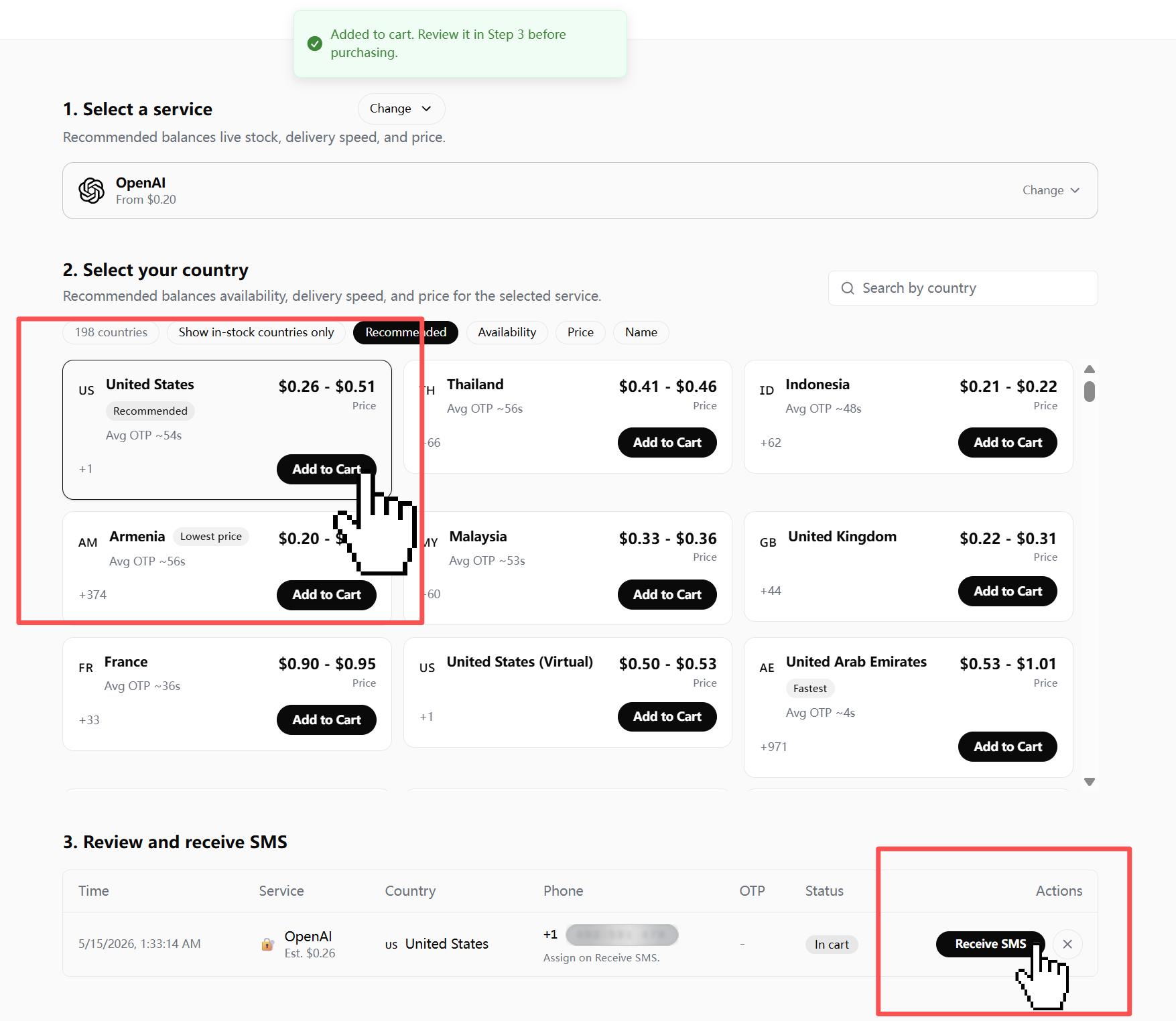
Step 3: Paste the number into OpenAI's verification screen
Copy the number you got from DogeSMS (full international format, e.g. +1 415 555 0123). Switch back to OpenAI's Add phone / verification page and paste it into the phone number field. Don't trim the country code, and don't add a leading 0 (see culprit 3 above for the +44 / +251 formatter bug).
Step 4: Back in DogeSMS, wait for the code
Don't hammer OpenAI's resend button (see culprit 2 above — silent rate limit). The code lands in DogeSMS within seconds.
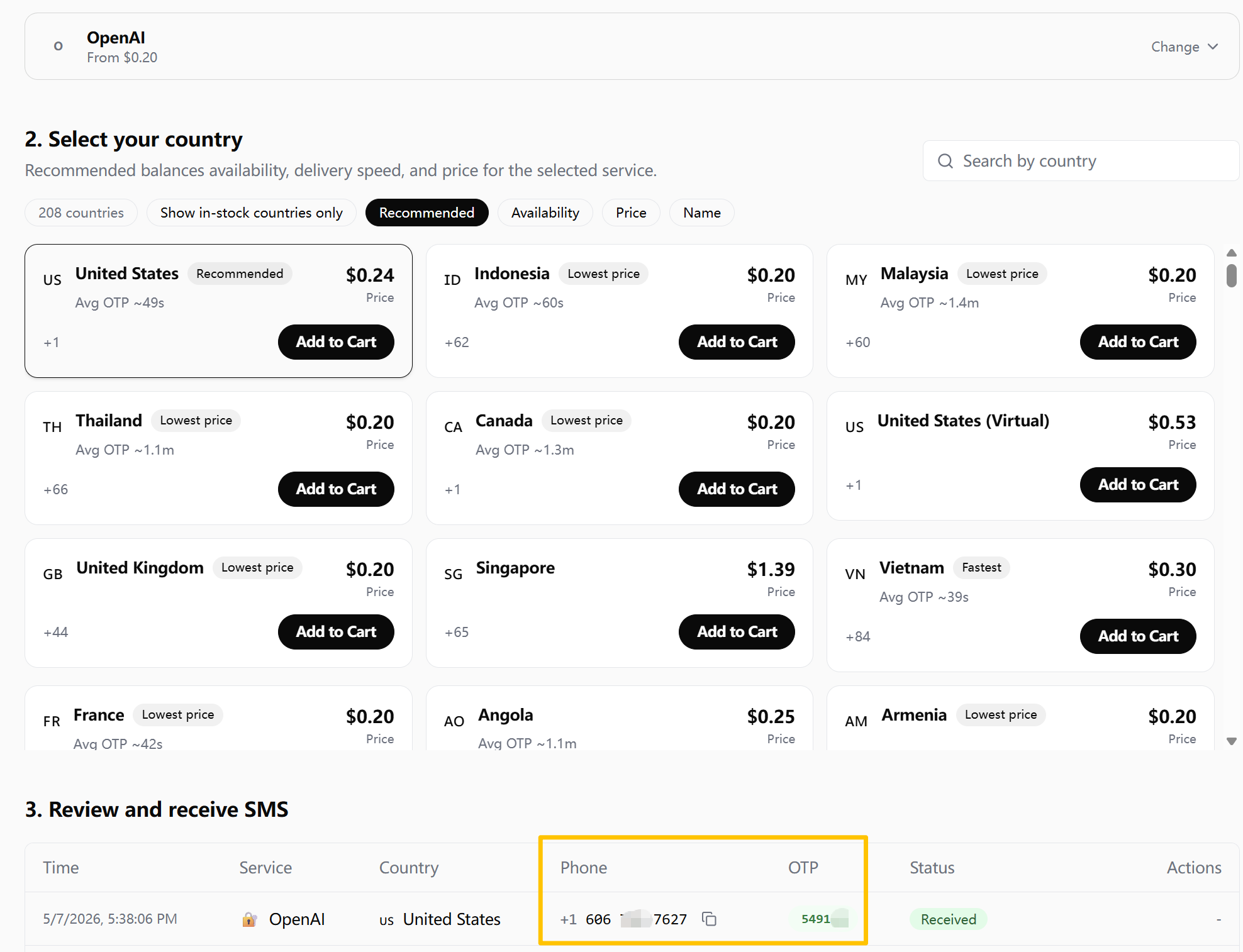
Step 5: Enter the code in OpenAI to finish
Once the 6-digit code shows up in DogeSMS, switch back to OpenAI's verification page and type it into the code field. Hit submit. If everything routed correctly (country, IP, no resend hammering), you're through to the next screen.
If the page says "a code sent via WhatsApp", that's a country routing issue (culprit 1) — come back to step 2 and switch country.
When this fits — and when it doesn't
Straight answer up front, so nobody walks away with the wrong expectation.
A good fit:
- You're trying to get Codex CLI past its "verify your number" wall, once
- You just signed into Codex on a new machine and got the prompt
- You're trying out Codex / Codex CLI and don't want to deal with a foreign SIM for this one step
Not a good fit:
- Binding this number as the trusted phone on your main ChatGPT account long-term — one-shot numbers aren't designed for that
- Account recovery — also not what this is for
And one thing to set straight: SMS verification only solves the code-entry step. It doesn't guarantee Codex access, Plus eligibility, API credits, or model availability. Those are decisions OpenAI makes elsewhere — and no number-level service can change them. Expectations aligned, the rest is straightforward.