Why Amazon Suspended All My Accounts (Prime Day 2026 Fix)
Why Amazon bans cluster before Prime Day, can it detect same WiFi or IP, and the three-layer architecture that keeps multi-account matrices alive.
Quick Take
If you're searching "why did Amazon suspend my accounts overnight" or "can Amazon detect multiple accounts on same WiFi" — the cluster suspension you're experiencing is rarely random and rarely about the day it happened. Three things are true at once:
- Amazon links accounts on hundreds of signals — IP, WiFi, device fingerprint, payment methods, phone numbers, addresses, even employee logins. When one in your cluster gets flagged, the platform suspends all linked accounts simultaneously, often without telling you which signal triggered it.
- Bans cluster before Prime Day, not after. Six to eight weeks before high-traffic events, Amazon runs higher-confidence risk-review sweeps to clean the platform of fragile account clusters before peak GMV. You're not unlucky — you're caught in a calendar pattern.
- Most operators isolate IP and browser fingerprint but ignore the phone number layer. A single recycled VoIP number (Google Voice, free SMS receivers, shared paid pools) used across 20 accounts is the silent link that chains the matrix. Even with perfect IP isolation, the phone signal alone can trigger a related-accounts suspension.
- The fix is architecture, not a hack. Three-layer isolation: independent residential IP, isolated browser fingerprint, and carrier-issued SMS verification numbers not shared across your account fleet. Match number quality to account tier — Real-SIM for high-value stores, Virtual for disposable lead-gen.
This guide explains the linking signals Amazon actually uses, why pre-Prime-Day is when bans cluster, the three-layer isolation architecture that survives, and a low-cost test-then-scale framework before you commit budget for the event.
Cross-border ecommerce account safety is an architecture problem solved months in advance. The teams that survive Prime Day built isolation right in May–June.
Why Did Amazon Ban All My Accounts Overnight (Before Prime Day)?
This is the most common search after a cluster suspension. Most sellers assume bans happen because they did something wrong on a specific day. The reality is more systematic: platforms run periodic risk-review sweeps timed to high-traffic events.
The pattern:
- Throughout the year, the platform's risk scoring continuously aggregates signals on every account — IP overlap, payment method reuse, device fingerprint similarity, SMS verification source, login patterns.
- Accounts accumulate "link weight" with each shared signal. A single shared signal isn't enough to ban; multiple signals across multiple accounts compound.
- Six to eight weeks before a major event (Prime Day, Black Friday, holiday shopping), the platform runs a higher-confidence sweep on accumulated link weights. Account clusters that share enough signals get suspended together.
- The seller experiences this as "all my stores died overnight" — but the linking happened over months. The pre-event timing is the platform protecting GMV during peak traffic.
The implication: by the time Prime Day arrives, your account fate is already mostly decided. The window to fix isolation issues is now (May–June), not the week before the event.
Can Amazon Detect Same WiFi or Same IP? The Three Linking Layers
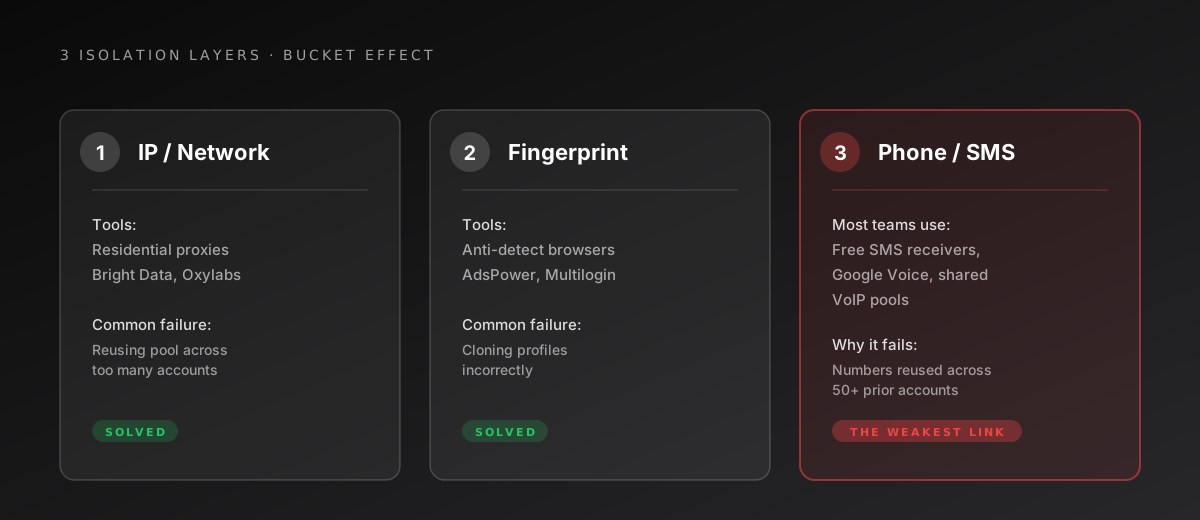
This is the second most common question — and the answer is yes, but it's more nuanced than just IP. Amazon's risk graph evaluates three primary signal layers when deciding if accounts are connected, and shared WiFi alone usually isn't enough — but combined with one or two other signals, it tips the entire cluster:
| Layer | What the platform checks | Tools sellers use | Where teams fail |
|---|---|---|---|
| IP / network | Residential vs. datacenter IP, ASN reputation, IP-to-account ratio | Residential proxies (Bright Data, Oxylabs), per-store SIM data plans | Reusing the same residential pool across too many accounts; using flagged datacenter IPs |
| Device / browser fingerprint | Browser entropy, canvas fingerprint, timezone, hardware signals, cookie graph | Anti-detect browsers (AdsPower, Multilogin, GoLogin), virtual machines | Cloning fingerprints incorrectly; using the same anti-detect profile across accounts |
| Phone number / SMS source | Number type (mobile vs VoIP), historical use across other platform accounts, carrier reputation | Most teams: free SMS receivers, Google Voice, shared paid pools | The most overlooked layer. A single recycled number used by 50 prior accounts in the platform's history makes your new account guilty by association |
The bucket effect: account safety is determined by your weakest layer. A team can spend $300/month on residential proxies and $200/month on anti-detect browsers, then verify accounts with numbers from a public SMS-receiver pool — and the entire matrix dies anyway.
Why Did Amazon Ban Me If My IP Looks Clean? The Phone Layer Hides the Real Link
If you're sure your IP and browser fingerprint are isolated and accounts still cluster-died, the answer is almost always the phone layer. Four technical reasons platforms weight phone-source signals heavily:
1. Phone numbers are easier to fingerprint than IPs. A residential IP can rotate; a phone number is durable. Once a number is tied to a flagged account, that linkage persists in the platform's database even after the account is closed.
2. VoIP detection is mature. Major platforms run HLR (Home Location Register) lookups against the number to verify it's tied to a real mobile carrier. Google Voice, TextNow, free SMS receiver services, and shared VoIP pools fail this check. The platform doesn't always reject the registration outright — they sometimes accept it and silently mark the account as "high risk pending review."
3. Shared numbers create cluster fingerprints. When 50 accounts in the platform's history have used the same phone number, that number is effectively a fingerprint for the cluster. New accounts using it inherit the cluster's risk score.
4. Recovery requires SMS. When the platform escalates risk review, they often re-verify the number. If you used a one-shot number that's already been recycled to another buyer, the re-verification fails — and the platform's risk model takes that as confirmation of fraud.
How Many Phone Numbers Do I Need for Multiple Amazon Accounts? Tier Them by Value
Not every account needs the same level of phone-source quality. Sensible operators tier their fleet:
| Tier | Account type | Phone source | Why |
|---|---|---|---|
| T0 | Main seller stores, PayPal-linked stores, brand-registered stores, accounts holding inventory or payment data | Real-SIM (carrier-issued mobile number) | Survives HLR lookup, passes platform fraud checks at registration and re-verification |
| T1 | Buyer test accounts, secondary store fronts, social-media matrix mains | Real-SIM preferred; Virtual acceptable | Real-SIM if account holds value beyond a single campaign; Virtual if it's truly disposable |
| T2 | Lead-generation accounts, one-shot signups, A/B test creatives | Virtual number | Volume play — disposable accounts where the number reuse risk is acceptable |
The economics: a single T0 store generating $10K+/month is destroyed if it shares phone signals with five T2 disposable accounts that get flagged. Spending a bit more on T0 is a rounding error against the value of the store. Spending more than necessary on T2 disposables is a waste.
DogeSMS provides both Real-SIM and Virtual numbers across 180+ countries, including the markets where Amazon, PayPal, Shopify, TikTok Shop, Etsy, Instagram, and Facebook accept SMS verification. Real-SIM numbers (OTP delivery in ~24 seconds) are connected to physical mobile carriers and pass HLR checks; Virtual numbers (OTP in ~1.4 minutes) work for less restrictive registrations.
The key isn't "buy the most expensive numbers everywhere" — it's matching number quality to the account's tier.
How to Test Phone Sources Before Buying in Bulk (Test-Then-Scale)
The biggest mistake operators make in May is buying 100 numbers up front, before they know what passes current platform filters. Filters change between Prime Days — what worked last year may fail this year.
The disciplined sequence:
Week 1 — Probe (small budget):
- Acquire 5 Real-SIM numbers and 5 Virtual numbers in your target market
- Register 5 accounts with each, controlling for IP and browser fingerprint isolation
- Track: registration success rate, account standing after 7 days, any silent risk flags
Week 2 — Measure:
- Real-SIM cohort vs Virtual cohort: 7-day survival rate
- Identify which accounts received re-verification challenges (a leading indicator of suspension)
- Calculate effective cost per surviving account
Week 3+ — Scale (with data):
- Allocate budget to the source that produced the highest survival rate per dollar
- Avoid one-time mass purchases; spread acquisitions over weeks to avoid creating a "new account spike" in the platform's pattern detection
This discipline is uncomfortable when you're feeling pre-Prime-Day urgency, but it's the difference between scaling a working setup and burning a budget on numbers that will be flagged en masse.
When This Architecture Hits Its Limits
The three-layer isolation model is built for legitimate multi-account operations. Here's where it stops compensating for other gaps.
Multi-account programs require structural separation, not just isolation
Most major platforms have formal multi-account approval programs (separate brands, distinct legal entities, distinct product categories). The isolation discipline above applies whether you're operating under approved permission or building a fresh structure — the platform's automated risk graph runs ahead of human review either way.
Phone numbers don't replace IP or fingerprint discipline
Real-SIM numbers prevent the SMS layer from being your weakest link, but they don't compensate for shared residential proxies or duplicated browser fingerprints. All three layers must be isolated — fixing one and ignoring the other two doesn't move the needle.
Filter changes are continuous
Last year's working setup may fail this year. Always probe with small batches before committing budget — the test-then-scale framework above is designed for exactly this.
Authenticator + backup number for each account
T0 and T1 accounts that you'll keep long-term need 2FA architecture beyond the registration phone. Immediately after registering each account, enable an Authenticator App as the primary 2FA method and replace the backup phone number with a permanent number you control. The one-shot SMS number gets recycled — without these two layers, the next security check on the platform locks you out.
No anti-detect setup is permanent
Platforms iterate detection. The teams that survive long-term treat account isolation as ongoing engineering, not a one-time setup.
TL;DR
Prime Day account fate is decided in May–June, not in July. The teams that survive treat multi-account operation as a three-layer isolation architecture: IP, browser fingerprint, and phone number source. The phone layer is the most commonly overlooked — and the weakest link breaks the matrix.
Match phone-source quality to account tier (Real-SIM for T0 high-value, Virtual for T2 disposable), test before scaling, and treat the May–June window as the actual preparation period — not the week before the event.
Looking for the bigger picture? Read the full Temporary Phone Number guide — when to use one, when not to, and how the pieces fit together.