Codex Beginner's Guide: From Zero to Productive AI Coding | DogeSMS
Just starting with OpenAI Codex? This guide covers 7 common beginner mistakes, 15 productivity techniques, Prompt templates, debug workflow, and Codex vs Cursor.
TL;DR: 5 things to remember if you're starting with Codex
- Codex isn't a smarter autocomplete — it's a task-level AI Coding Agent.
- Don't ask Codex to write code right away. Let it analyze the project first.
- The more specific the prompt and the richer the context, the more stable the output.
- The real efficiency of AI coding doesn't come from one-shot generation — it comes from fast iteration.
- What separates power users from beginners isn't the model. It's the workflow.
First time with Codex? Start with the Codex Quick Start for Beginners: 5-Minute Guide to grab the essentials fast. This page is the full deep version — for people who want to really use it well.
Before you start: Codex won't let you in?
Just downloaded Codex, ready to dive in, but stuck at the login screen with a verify your phone number prompt? That's a new gate OpenAI rolled out in early 2026 for free Codex users — nothing to do with your account, and definitely nothing to do with Codex itself. If you haven't cleared this door yet, the rest of this guide doesn't matter.
Quick triage
| Symptom | Root cause | What to do |
|---|---|---|
invalid_phone_number after entering a number | Country not supported | Use US / UK / RU / IN |
| Code never arrives | Country routes via WhatsApp, or silent rate limit on resend | Switch country / stop clicking, wait 15-20 min |
403 Country not supported after entering the code | Your egress IP is flagged | Use a clean, reserved residential IP |
| ChatGPT works in browser, Codex CLI demands phone | Different entry points have different risk thresholds | The CLI gate is mandatory; no way around it |
Full walkthrough with 5 screenshots:
→ Codex Phone Verification: Fix the Missing SMS Code
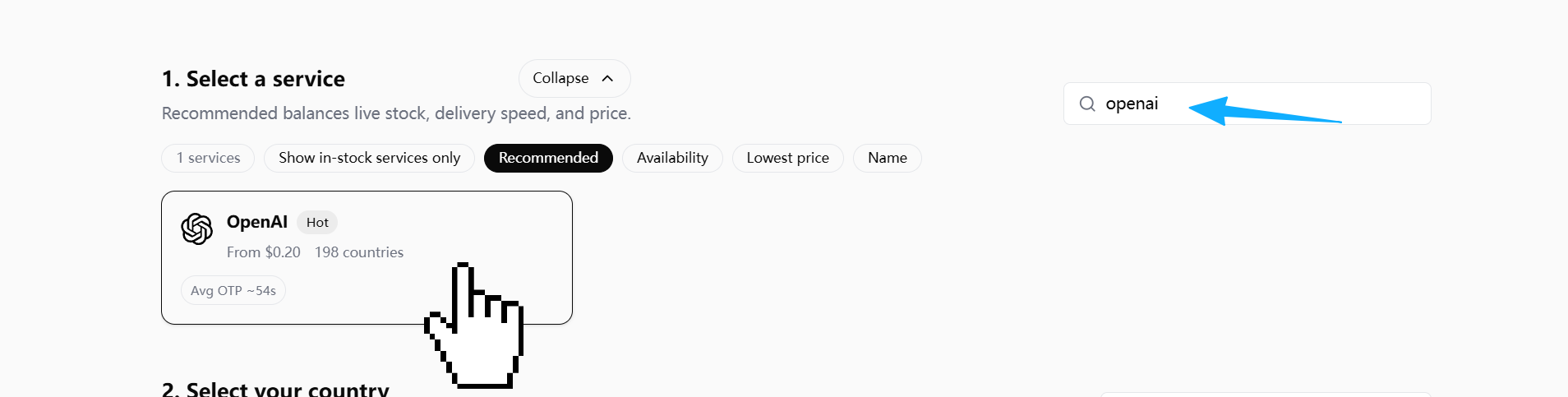
If you're using DogeSMS for the SMS code, pick the OpenAI / ChatGPT card — Codex verification routes through OpenAI's account layer
Door cleared? Good. Below is how to actually use Codex well.
Why so many developers use Codex but never get more productive
Most developers hit a familiar arc on their first week with Codex:
- Initial wow
- Then: generating code like crazy
- Then: bugs piling up
- Then: starting to wonder if AI coding is hype
The model usually isn't the problem. The real issue:
Most people never build an AI coding workflow.
They treat Codex like a smarter autocomplete.
The people who get serious productivity out of it don't work that way. They let Codex:
- Understand the project first
- Then analyze the requirement
- Then break the task down
- Then make small, scoped changes
- Then review, test, and iterate
In other words:
Codex's core value isn't writing a few lines of code for you. It's helping you build an AI-driven software development process.
What is Codex, and why it isn't just a smarter Copilot
A lot of people assume Codex is just "Copilot, but stronger." It isn't.
Traditional autocomplete tools:
- Complete code based on the current file
- Focus on "what's the next line"
- Operate in a local scope
Codex is closer to:
An AI Coding Agent that can understand tasks, analyze projects, and execute development steps.
It can write code, fix bugs, generate tests, refactor components, explain errors, and read repositories. More importantly, it can participate in the full software development lifecycle.
Codex vs traditional AI coding tools
| Dimension | Traditional autocomplete | Codex |
|---|---|---|
| Working mode | Complete code | Complete tasks |
| Scope of understanding | Current file | Project structure |
| Interaction | Auto-completion | Multi-round collaboration |
| Core capability | Write code | Understand + analyze + execute |
| Best for | Local coding | Agent workflows |
One mindset shift that changes everything
Beginners often ask:
"Why is AI-generated code so unstable?"
Because:
AI coding's core isn't generation — it's understanding.
If the context is thin, the AI starts guessing. The moment AI starts guessing:
- More bugs
- Architecture drifts
- Diff explodes
- Maintenance cost rises
So:
The first principle of productive Codex use isn't "get it to write code fast." It's "get it to understand the problem first."
7 mistakes 90% of Codex beginners make
Before the 7 mistakes, one real wreck story.
A real wreck story: I asked Codex to fix a login bug — it refactored the entire auth flow
A while back I asked Codex to fix a Next.js login redirect bug — clicking Sign In did nothing. My prompt was one line: fix this login bug.
What did it do?
It refactored the entire auth flow. NextAuth config changed, session handling rewritten, form schema upgraded to Zod 4 on the side, onSubmit rewritten as a React Query mutation, Tailwind styles also "optimized" along the way.
Result:
The original bug wasn't fixed (it was just a missing onSubmit handler on <form>), but 20 new problems showed up — TypeScript errors everywhere, refresh token logic drifting, E2E tests all broken, Prisma migration not even caught up.
The 7 mistakes below are the diagnostic categories for that kind of wreck.
Mistake 1: Treating Codex like a chatbot
A common beginner prompt:
Build me a blog system.This has no:
- Tech stack
- Architecture constraints
- Data source
- UI conventions
- Existing project structure
- Deployment target
The AI has no choice but to guess. And once it starts guessing, results get worse fast.
Better:
You are working in an existing Next.js project.

Goal:
Build a blog list page.

Context:
- Framework: Next.js App Router
- Styling: Tailwind CSS
- Data source: markdown files
- No database
- No new dependencies

Before coding:
1. Analyze project structure
2. Explain implementation plan
3. Identify affected files
4. Wait for approval
Codex isn't a wish-granting machine. What you give it is a task spec, not a wish.
Mistake 2: No context
Bad prompt:
Why is this component throwing an error?The AI has no way to know:
- What framework
- What error
- What the expected behavior is
- What was recently changed
- Which files are related
Better:
Analyze this bug.

Context:
- Framework: React
- Expected behavior: login redirects to dashboard
- Actual behavior: nothing happens
- Error: Cannot read property 'map' of undefined
- Related files: login.tsx, auth.ts

Do not fix yet.
First identify root cause.
Strong AI users always volunteer error logs, project structure, related files, expected behavior, actual behavior, recent changes.
An AI coding agent's real capability ceiling is set by context quality.
Mistake 3: Asking for everything at once
A classic beginner move:
Build me a SaaS.The more an AI outputs in one shot, the higher the probability of losing control.
Correct approach: decomposition.
Break this project into phases.

For each phase:
- goal
- files affected
- risks
- dependencies
- test strategy
Recommended workflow: Phase 1 requirements → Phase 2 database → Phase 3 API → Phase 4 pages → Phase 5 tests → Phase 6 deploy.
Mistake 4: Asking Codex to just "fix the bug"
Bad:
Fix this bug.What happens: the AI guesses, makes broad changes, refactors on the side, and your diff explodes.
Better:
Do NOT fix the bug yet.

First:
1. Identify root cause
2. Explain why it happens
3. List possible fixes
4. Compare tradeoffs
5. Recommend smallest safe fix
Why power users do this:
The core of debugging isn't "fix it fast" — it's "find the right problem fast."
Surface bugs often hide under a deeper layer (the frontend issue is actually a backend contract change; the API issue is actually a state management bug). If the root cause is wrong, fixing fast just dies faster.
Mistake 5: Not constraining the modification scope
The AI loves to refactor on the side, polish formatting, unify style, etc. You started fixing a small bug, and you end up with a 500-line diff.
Better:
Only modify:
- auth.ts
- login.tsx

Do not touch:
- package.json
- database schema
- unrelated files
The best AI change isn't the most ambitious one — it's the smallest, clearest, most reviewable one.
Mistake 6: Not making the AI review itself
Most people: AI writes → copy/paste.
Power users: AI writes → make the AI review itself.
Prompt:
Review the code you just generated.

Check:
- bugs
- edge cases
- security risks
- performance issues
- maintainability
Why it works: "generate" and "review" are different modes for the AI. On the second pass, it tends to catch missed edge cases, type unsafety, potential nulls, permission issues, and gratuitous complexity.
Mistake 7: No long-term rules
Productive teams don't re-explain project rules every session. They put rules in files. For example, coding_rules.md:
Coding Rules:

- Keep diffs small
- No unnecessary dependencies
- Prefer readability
- Preserve architecture
- Do not rewrite unrelated code
Why it matters:
The AI's biggest weakness isn't "not smart enough" — it's "not stable enough."
Rule files are how you constrain it, stabilize it, and lock in team conventions.
Errors vs corrections: one cheat sheet
7 mistakes covered. If you only walk away with one table, take this:
| Wrong way | Right way |
|---|---|
| Let the AI write code right away | Have the AI analyze the project and propose a plan first |
| Give a giant "build me a SaaS" request | Break into 6-8 phases, each with a plan before code |
| No scope limit | Freeze the file list — explicit on what can and can't change |
Let the AI just fix the bug | Have it find root cause → compare fixes → recommend smallest safe fix |
Fuzzy goals (optimize this code) | Explicit constraints (don't change public APIs / no new deps / no reformat) |
| Copy AI output straight into the project | Switch it to review mode as a senior engineer and re-pass |
| Re-explain project rules every session | Build coding_rules.md, have Codex read it before every task |
Secondary use: paste this table into your Cursor / Codex system prompt as a persistent constraint. Write once, benefit forever.
15 high-leverage techniques after the basics
Technique 1: Analyze first, code later
The single biggest gap between beginners and power users.
Beginner:
Implement login.Power user:
Before coding:
1. Analyze current auth flow
2. Explain data flow
3. Identify risky areas
4. Propose implementation plan
Real software development isn't "writing code" — it's understanding the problem, controlling risk, staying consistent. The AI's biggest issue isn't capability — it's that thin context makes it guess.
First principle of productive Codex use: let the AI explain what it's about to do before it actually does it.
Technique 2: Constrain first, generate second
Ordinary prompt:
Optimize this component.Advanced:
Optimize for:
- readability
- maintainability

Do not:
- change public APIs
- add dependencies
- rewrite unrelated code
The AI fears fuzzy goals and loves bounded tasks. Sharper boundaries = more stable output, smaller diffs, fewer bugs.
Technique 3: Make the AI ask questions
The most advanced prompts aren't long. They're prompts that surface missing information.
A great prompt:
Before implementation,
ask me any missing questions needed
to avoid incorrect assumptions.
Many errors aren't wrong code — they're wrong requirement understanding.
One of the best ways to cut AI hallucinations: have the AI surface its assumptions before it acts.
Technique 4: Make the AI read the project first
Power users don't fire prompts the moment they open the repo. They make the AI understand the codebase first.
Prompt:
Analyze this repository first.

Explain:
- architecture
- coding patterns
- API structure
- risky areas
AI coding's core isn't generation — it's understanding.
If the AI doesn't understand the project: code style drifts, architecture conflicts, logic duplicates, state flow breaks.
Technique 5: Minimum-change principle
The AI loves "while-I'm-here refactors." A small bug fix turns into half your project getting touched.
Prompt:
Apply the minimal possible fix.

Do not:
- refactor unrelated code
- rename variables
- change formatting
In real projects, what matters isn't "theoretically optimal." What matters is reviewable, rollback-safe, low-risk.
In real development, the small and stable change usually beats the big and beautiful refactor.
Technique 6: Freeze the modification scope
Advanced move.
Only modify:
- auth.ts
- login.tsx

Do not touch:
- package.json
- tests
- unrelated files
This prevents: global pollution, context drift, unrelated changes, megadiffs.
Technique 7: Debug — find the cause, not the fix
Beginner:
Fix the bug.Power user:
Do NOT fix yet.

First:
1. identify root cause
2. explain why
3. compare solutions
The core of debugging isn't fixing — it's locating.
Technique 8: Iterate, don't one-shot
The AI's strongest mode isn't creation. It's fast iteration.
Power-user workflow:
| Round | Action |
|---|---|
| 1 | Analyze |
| 2 | Plan |
| 3 | Implement |
| 4 | Review |
| 5 | Test |
| 6 | Refine |
Complex tasks generated in one shot have a high chance of going off the rails. Small-step iteration is more stable, more controllable, more reviewable.
The real efficiency of AI coding doesn't come from one-shot generation — it comes from fast iteration.
Technique 9: Make the AI review itself
Review the code you just wrote.

Check:
- bugs
- edge cases
- performance
- maintainability
In review mode, the AI focuses on risk, edge cases, type issues, security.
Technique 10: Give the AI a role
Ordinary:
Optimize the API.Advanced:
Act as a senior backend engineer focused on scalability.

Review this API.
Different roles, different attention:
| Role | Focus |
|---|---|
| Backend Engineer | Performance, database, reliability |
| Frontend Engineer | UX, state management |
| Security Engineer | Permissions, security |
| QA Engineer | Tests, edge cases |
Technique 11: Generate a plan document first
Power users don't dive into code. They have the AI write architecture.md, implementation_plan.md, migration_plan.md first.
Create an implementation plan before coding.

Include:
- risks
- edge cases
- rollout strategy
Why it matters: plans are easier to review than code. If the direction is wrong, you catch it before code lands.
Technique 12: Learn Context Engineering
The most important future skill isn't Prompt Engineering — it's Context Engineering.
Context Engineering is using README, architecture docs, rule files, example code, test cases, and API specs to help the AI understand the project accurately.
An AI coding agent's real capability ceiling is set by context quality.
Technique 13: Don't chase the perfect prompt
Beginners hunt for "universal prompts." In real development, there is no universal prompt. Power users iterate prompts fast, instead of dreaming of one-shot success.
The most productive AI developers aren't the ones who write the perfect prompt — they're the ones who iterate prompt and result fastest.
Technique 14: Build long-term rule files
Recommended: coding_rules.md
- Keep diffs small
- No unnecessary dependencies
- Preserve architecture
- Prefer readability
Rule files are how you stabilize, constrain, and codify team conventions.
Technique 15: Treat the AI as a junior engineer
Don't treat the AI as a god. Don't treat it as autocomplete. The best framing:
A junior engineer that executes extremely fast but needs management.
What the AI is good at: boilerplate, repetitive logic, initial debugging, test generation, doc generation, local refactors.
What the AI is bad at: long-term architecture, business understanding, risk judgment, permission design, financial logic, product decisions.
The strongest AI developer isn't the one writing the best prompts — it's the one organizing the best AI workflow.
Essential Codex Prompt templates
Project understanding
Analyze this repository before making changes.

Explain:
- architecture
- important modules
- coding conventions
- risky areas
Debug
Do NOT fix the bug yet.

First:
1. identify root cause
2. explain why
3. compare fixes
Minimal fix
Apply the minimal safe fix.

Do not rewrite unrelated code.
Review
Review this code as a senior engineer.

Check:
- bugs
- security
- maintainability
Test generation
Generate tests.

Include:
- happy path
- edge cases
- error cases
Refactor
Refactor for readability.

Do not change behavior.
Security review
Review this code for security risks.API design
Review this API design.

Focus on:
- errors
- auth
- scalability
The power-user Codex workflow
Beginner workflow:
Ask AI → Copy code → Error → Ask againPower-user workflow:
Human defines intent
→ AI analyzes context
→ AI proposes plan
→ Human reviews
→ AI implements small change
→ AI reviews itself
→ Human tests
→ AI refines
Why it's more stable: it's controllable, reviewable, rollback-safe, and low-risk — instead of "let the AI freestyle."
Codex vs Cursor vs Claude Code
| Tool | Strength | Weakness | Best for |
|---|---|---|---|
| Codex | Strong agent capabilities | Steeper learning curve | Developers building AI workflows |
| Cursor | Smooth IDE experience | Weaker agent flow | Beginners |
| Claude Code | Strong long-context understanding | Weaker execution | Large-project analysis |
How to choose: Brand-new to AI coding → Cursor is easier to start with. Building an Agent Workflow → Codex is stronger. Frequently reading large repos → Claude Code fits.
How to make Codex actually understand your project
Recommended:
/docs
  architecture.md
  coding_rules.md
  api_contract.md
Why it matters: an AI without context is like an intern. An AI with full context behaves more like a teammate.
Codex productivity checklist
Run through this before having Codex modify code:
- [ ] Did I state the goal?
- [ ] Did I provide context?
- [ ] Did I constrain the scope?
- [ ] Did I ask for minimum change?
- [ ] Did I ask it to analyze first?
- [ ] Did I ask for a plan?
- [ ] Did I ask for review?
- [ ] Did I ask for tests?
- [ ] Did I avoid one giant request?
- [ ] Did I write down the project rules?
From beginner to power user: capability roadmap
Stage 1: Can write prompts
Capabilities: describing tasks, providing context, generating small features.
Stage 2: Can decompose tasks
Capabilities: scoping, lowering risk, small-step iteration.
Stage 3: Can debug
Capabilities: root-cause analysis, comparing fixes, adding tests.
Stage 4: Can review
Capabilities: spotting risk, declining over-refactors, reading diffs.
Stage 5: Can design workflows
Capabilities: building rules, maintaining context, managing the AI agent.
Leveling up on Codex is really about going from "writing prompts" to "designing AI workflows."
Why software development is moving toward agent collaboration
Past:
Human → CodePresent:
Human → Prompt → AI → CodeFuture:
Human → Intent
AI → Plan
AI → Implement
AI → Test
Human → Review
AI → Iterate
What will matter for future developers isn't memorizing syntax, drilling APIs, or hand-writing boilerplate. It's task decomposition, managing AI, organizing context, reviewing results, controlling risk.
The most important skill for future developers won't be memorizing syntax — it'll be organizing AI workflows.
In summary: what separates power users isn't Codex, it's the workflow
If you're starting with Codex, don't chase "one prompt, full project."
The approach that actually works:
- Let the AI understand the project
- Let the AI analyze the problem
- Let the AI propose a plan
- Let the AI make the smallest change
- Let the AI review and iterate
Because:
Codex's core value isn't writing code for you — it's giving you a controllable, iterable, reviewable AI collaboration process.
What separates power users from beginners has never been who has the bigger model. It's who organizes the AI workflow better.
If you got stuck on the phone verification gate from the top of this guide, the full walkthrough is here: Codex Phone Verification: Fix the Missing SMS Code.